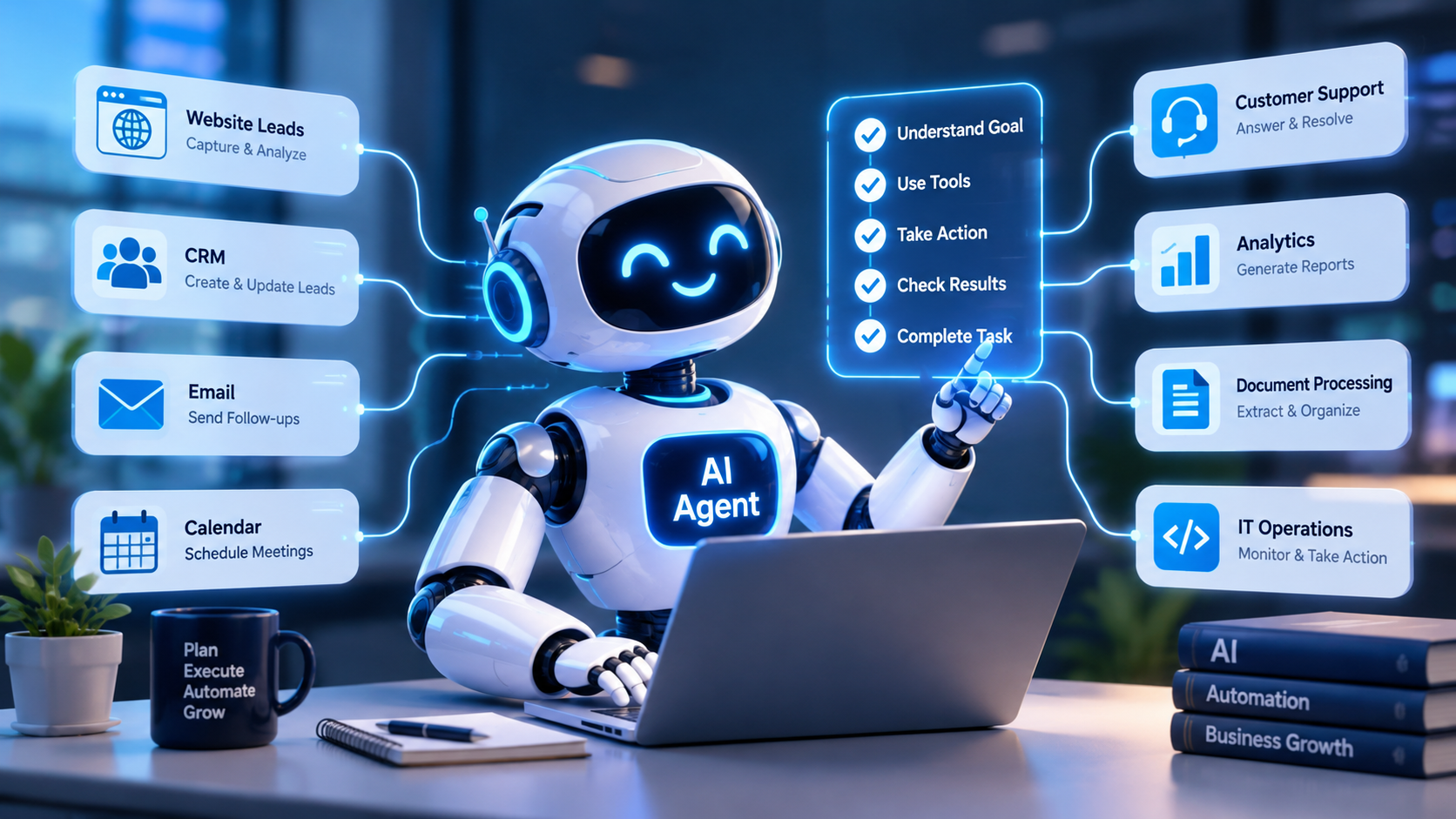
Artificial intelligence is moving beyond simple question-and-answer chatbots. In 2026, businesses are increasingly exploring AI agents that can understand goals, use connected tools, complete multiple steps, and assist with real operational tasks.
Imagine a website enquiry arriving at your company. Instead of only generating a reply, an AI agent could categorize the enquiry, retrieve relevant service information, check lead qualification criteria, create a CRM record, and prepare a follow-up for the sales team. With suitable integrations and permissions, parts of this process can happen automatically.
However, AI agents are not a magic solution for every business problem. Their effectiveness depends on the quality of the underlying AI model, the tools available to the agent, the accuracy of business data, and the controls used to manage its actions.
In this guide, we explain what AI agents are, how they work, which business processes they can automate, and how organizations can implement them responsibly.
What Are AI Agents?
An AI agent is a software system that uses an AI model to interpret a goal, determine appropriate next steps, and interact with tools or connected systems to complete a task. Depending on its design, it may retrieve information, call APIs, analyze results, update records, or continue working through a multi-step process.
Traditional automation usually follows predefined rules and sequences. An AI agent can adapt its next action based on the information it receives and the results of previous steps. This makes agents useful for certain tasks involving unstructured information or changing conditions.
For example, a conventional automation workflow might send the same acknowledgement email whenever someone submits a form. An AI-powered agent could additionally classify the enquiry, identify the relevant service, retrieve approved information, and prepare a response tailored to the customer's request.
The agent should still operate within clearly defined permissions and business rules. Adaptability does not mean unlimited authority or guaranteed accuracy.
How Do AI Agents Work?
AI agents typically combine an AI model with instructions, business context, tools, and a mechanism for tracking task progress. The exact architecture depends on the application and the level of autonomy required.
1. Receive a Goal or Trigger
An agent begins when a user submits a request or an event triggers a workflow. The trigger could be a website enquiry, a new CRM record, an incoming support ticket, or a scheduled task.
The system interprets the goal and determines what information is needed before proceeding.
2. Gather Relevant Information
The agent may retrieve approved information from a knowledge base, database, CRM, internal documents, or other connected sources. Retrieval helps the agent work with business-specific context rather than relying only on general model knowledge.
Access controls should ensure that the agent retrieves only information permitted for the task and the requesting user.
3. Plan the Next Actions
Using the available context and its instructions, the agent selects the next appropriate action. It may decide to search for a record, validate information, call an API, or ask a clarifying question.
For predictable and sensitive processes, developers can constrain the agent to an approved workflow rather than allowing it to choose every step freely.
4. Use Tools and APIs
Tools connect the agent to systems where work actually happens. Depending on permissions, these tools may search documents, retrieve order information, create CRM records, draft emails, or initiate internal workflows.
The AI model does not automatically have access to every business system. Developers must implement integrations, authentication, permission checks, and validation for each action.
5. Check Results and Continue
After a tool runs, the agent can inspect its result and determine whether another step is required. If a CRM update fails, for example, the agent may retry within defined limits or report the issue to a human.
This cycle continues until the goal is completed, the agent reaches a defined stopping condition, or human assistance is required.
6. Record the Outcome
A production system should record relevant actions, results, errors, and approval decisions. This creates an audit trail and helps teams investigate problems, evaluate performance, and improve the workflow.
AI Agents vs Chatbots vs Traditional Automation
These technologies serve different purposes, although they can be combined in the same application.
- Traditional automation: Executes predefined rules and steps. It works well for predictable processes such as scheduled reports or straightforward data synchronization.
- Chatbots: Primarily interact with users through conversations. Some are rule-based, while others use AI to answer questions and retrieve information.
- AI agents: Can select tools and actions dynamically, evaluate intermediate results, and coordinate multiple steps toward a goal.
Consider a customer asking about an order. A chatbot might explain the order-status process. A traditional workflow might retrieve a status when given an order number. An appropriately authorized AI agent could understand the request, retrieve the order, explain the current status, and create an escalation ticket if a delivery problem is detected.
The most suitable approach depends on the complexity, risk, cost, and predictability of the task. A simple function or fixed workflow is often better than an AI agent when the process is straightforward.
What Businesses Can Automate with AI Agents in 2026
1. Customer Support and Service Operations
AI agents can help support teams handle repetitive enquiries, retrieve approved product information, summarize customer conversations, classify tickets, and route complex cases to the appropriate team.
For example, a software company could connect an agent to its help center and ticketing platform. When a customer reports a common configuration problem, the agent could retrieve relevant troubleshooting instructions and prepare a response. If the issue involves account security or an unresolved technical fault, it could escalate the ticket to a human specialist.
Potential benefits: Faster access to information, more consistent support workflows, and reduced repetitive work for service teams.
2. Sales and Lead Qualification
Sales agents can assist with incoming enquiries by extracting relevant details, categorizing prospects, checking qualification criteria, and preparing next steps for a sales representative.
Consider a website development company receiving enquiries about mobile apps, e-commerce platforms, and enterprise software. An AI agent could identify the requested service, summarize the prospect's requirements, create a CRM record, and recommend the correct sales team based on predefined routing rules.
Automated lead scoring should be evaluated against actual sales outcomes. Important commercial decisions should not rely solely on an unverified AI-generated score.
Potential benefits: Better-organized enquiries, less manual CRM entry, and faster follow-up processes.
3. Marketing Operations and Campaign Reporting
Marketing teams can use AI agents to summarize campaign performance, compare results with targets, identify unusual changes, and prepare reports from connected analytics platforms.
For example, an agent could review approved campaign metrics, highlight landing pages with declining conversion rates, and generate a report showing potential areas for investigation. A separate approval process should govern any changes to advertising budgets, targeting, or live campaigns.
Potential benefits: Faster reporting, improved visibility into campaign performance, and reduced manual analysis.
4. E-Commerce Order and Inventory Workflows
E-commerce businesses can use agents to help customers check order information, classify returns requests, identify inventory discrepancies, and coordinate routine operational tasks.
An agent connected to an order-management system could retrieve an order status, explain the relevant return policy, and prepare a return request. Refunds, cancellations, or other consequential actions should follow explicit authorization and approval rules.
Potential benefits: More efficient order enquiries, consistent policy handling, and better coordination between customer service and operations.
5. Document Processing and Data Entry
Businesses regularly receive invoices, purchase orders, contracts, forms, and reports in different formats. AI agents can coordinate document extraction, validation, categorization, and data transfer into business systems.
For instance, an agent could extract supplier details from an invoice, compare them with an approved vendor record, flag missing fields, and prepare the information for accounting software. Financial approvals and payment execution should remain subject to the organization's authorization controls.
Potential benefits: Reduced manual data entry, faster document handling, and improved exception management.
6. Internal Knowledge and Employee Assistance
Employees often spend time searching through policies, technical documentation, onboarding guides, and internal knowledge bases. An AI agent can retrieve relevant information and summarize it in response to an employee's question.
A development team, for example, could use an internal assistant to locate API documentation, explain approved deployment procedures, or identify relevant troubleshooting guides. Responses should reference the original sources when possible and respect document permissions.
Potential benefits: Faster knowledge discovery, easier onboarding, and fewer repetitive internal questions.
7. Software Development and IT Operations
AI agents can support software engineering by helping investigate errors, summarize logs, propose code changes, generate tests, and coordinate approved development workflows.
An IT operations agent might detect a failed scheduled job, gather relevant logs, identify likely causes, and create an incident ticket with supporting evidence. In a carefully controlled environment, it might also perform an approved recovery action.
Production deployments, destructive commands, permission changes, and security-sensitive operations should use strict access controls and human approval where appropriate.
Potential benefits: Faster initial investigation, better incident documentation, and more efficient routine maintenance.
8. ERP and Business Process Coordination
AI agents can coordinate information across systems used for finance, procurement, inventory, customer management, and operations. They may validate incoming information, identify discrepancies, and route exceptions for review.
For example, an agent could compare purchase-order information with invoice records, flag mismatches, and prepare a summary for an accounts team. The underlying financial records should still be updated through controlled business processes.
Potential benefits: Improved coordination across departments and more efficient handling of multi-step workflows.
9. Appointment Scheduling and Enquiry Management
Service businesses can use AI agents to collect appointment preferences, check connected scheduling systems, identify suitable available slots, and prepare booking requests.
A clinic, consultancy, or service provider could integrate an agent with its approved scheduling platform. The agent should confirm the actual availability returned by the system rather than inventing appointment times.
Potential benefits: Reduced scheduling administration, quicker enquiry handling, and clearer communication with customers.
Single AI Agents vs Multi-Agent Systems
A single agent can be sufficient for a task involving a small number of tools and a clear objective. A multi-agent system separates responsibilities across multiple specialized agents or components.
For example, a business reporting system might use one component to retrieve approved metrics, another to analyze trends, and another to draft a report. A coordinating workflow can validate the outputs before presenting the final result.
Multiple agents can help organize complex processes, but they also add coordination overhead, cost, latency, and additional failure points. They should be introduced only when the benefits justify the extra complexity.
Technologies Used to Build AI Agents
AI agent development combines models, application code, integrations, and operational controls. The appropriate technology stack depends on the use case and existing infrastructure.
- Large language models: Interpret requests, reason about available context, and select suitable tool calls.
- Backend frameworks: Node.js, Python, or other server technologies manage business logic, authentication, APIs, and agent execution.
- Agent frameworks: Frameworks such as Microsoft Agent Framework can help developers build tool-using agents and controlled workflows.
- API integrations: Connect agents to CRM platforms, databases, scheduling systems, support tools, and internal applications.
- Retrieval systems: Search approved documents and knowledge bases to provide relevant context.
- Databases and state management: Store task progress, permitted conversation history, workflow state, and relevant records.
- Monitoring and security: Provide logs, access controls, testing, usage limits, and evaluation of agent behaviour.
Developers should select frameworks based on reliability, maintainability, integration requirements, data handling, and long-term support rather than choosing tools solely because they are trending.
How to Build an AI Agent for Your Business
Step 1: Choose a Specific Business Problem
Identify a repetitive or information-intensive process with measurable costs or delays. Examples include lead categorization, document processing, support-ticket routing, or internal knowledge search.
Define what success means before selecting a model or framework.
Step 2: Map the Existing Workflow
Document the current process, required inputs, business rules, system dependencies, exceptions, and approval points. Identify which steps require judgment and which can be handled reliably through conventional automation.
Step 3: Select the Tools and Data Sources
Determine which APIs, databases, documents, or business systems the agent needs. Implement least-privilege access so the agent receives only the permissions required for its task.
Step 4: Build a Controlled Prototype
Create a limited version that handles a narrow set of tasks. Use representative test data, clearly defined instructions, validated tool inputs, and explicit stopping conditions.
Step 5: Test Accuracy and Failure Scenarios
Evaluate successful tasks, ambiguous requests, missing information, incorrect model outputs, API failures, duplicate requests, and unauthorized actions. Verify that the agent stops safely or escalates when it cannot proceed reliably.
Step 6: Introduce Human Approval
Require review for actions such as payments, refunds, external communications with significant consequences, permission changes, and production deployments when the risk warrants it.
Start with read-only access or draft-only actions where possible, then expand permissions gradually as the system demonstrates reliable performance.
Step 7: Deploy, Monitor, and Improve
Monitor task completion, error rates, response quality, escalation frequency, API usage, and operating costs. Keep audit logs and establish procedures for disabling the agent or rolling back problematic changes.
Review performance regularly and update the system when business rules, connected systems, or data sources change.
Security and Risks of AI Agents
Because AI agents can interact with business systems, their security requirements extend beyond those of a basic conversational application.
- Excessive permissions: An agent should not receive broad access when a smaller set of permissions is sufficient.
- Prompt injection: Instructions hidden in webpages, documents, or other untrusted content may attempt to manipulate an agent's behaviour.
- Incorrect actions: A model may select the wrong tool, misunderstand a request, or provide incorrect arguments.
- Data exposure: Sensitive business information may be revealed if retrieval, access control, or logging is poorly designed.
- Uncontrolled spending: Repeated tool calls or long-running tasks can increase model and infrastructure costs.
- Weak auditability: Missing logs make it difficult to determine why an action occurred or how to investigate a failure.
Useful safeguards include least-privilege permissions, strict input validation, output validation, action allowlists, execution limits, human approval, monitoring, and adversarial testing.
AI agents should also be evaluated for reliability and policy compliance before they are trusted with sensitive or consequential business tasks.
How Much Does AI Agent Development Cost?
There is no single price for building an AI agent. Costs vary depending on workflow complexity, model selection, data preparation, number of integrations, security requirements, hosting, monitoring, and ongoing maintenance.
A simple internal knowledge assistant may require fewer integrations than a multi-step sales or operations agent connected to several enterprise systems. Production deployments also need testing, logging, error recovery, and operational support.
To estimate costs realistically, define the business objective, expected usage, required integrations, acceptable response times, security requirements, and success metrics. A small proof of concept can help validate feasibility before committing to a larger implementation.
How to Measure AI Agent Performance
Measure whether the agent completes the intended business task accurately and safely, rather than judging it only by how natural its responses sound.
- Task completion rate: How often the agent successfully completes eligible tasks.
- Accuracy: Whether retrieved information, classifications, and actions are correct.
- Time saved: The difference between the original workflow time and the assisted workflow time.
- Escalation rate: How often the agent needs human intervention.
- Error rate: Frequency of failed tool calls, incorrect updates, or policy violations.
- Cost per completed task: Model, infrastructure, integration, and operational costs.
- Business outcomes: Changes in response times, lead handling, processing time, customer satisfaction, or other relevant indicators.
Establish a baseline before deployment and compare the results using representative real-world tasks. Automation is valuable only when it improves the process without introducing unacceptable risk.
Are AI Agents Right for Every Business?
AI agents are most useful when a task involves multiple steps, variable inputs, information retrieval, or decisions that can be safely bounded by business rules.
They may be unnecessary for simple tasks that can be completed more cheaply and reliably with a conventional function, scheduled job, or fixed automation workflow.
Businesses should also consider data readiness, the consequences of incorrect actions, integration complexity, ongoing costs, and the availability of people who can supervise the system.
A practical strategy is to begin with a narrow use case, test it against clear criteria, and expand only when the results justify greater autonomy.
How The Codx Can Help Businesses Explore AI Automation
Implementing AI agents successfully requires a combination of software engineering, business process analysis, API integration, data management, and security planning.
The Codx works across software development and digital solutions. Businesses exploring AI-powered workflows can begin by identifying a repetitive process, assessing the systems involved, and determining whether an AI agent, conventional automation, or a hybrid solution is the best fit.
A focused implementation can help validate the business case before expanding to more complex workflows. The solution should be designed around measurable objectives, appropriate access controls, reliable integrations, and a clear process for human oversight.
To discuss your software development and automation requirements, visit The Codx website.
Frequently Asked Questions
What is an AI agent in simple terms?
An AI agent is software that can interpret a goal, choose from available tools, and perform a sequence of actions to complete a task within defined limits.
How are AI agents different from chatbots?
A chatbot primarily focuses on conversation. An AI agent can also use connected tools and systems to carry out tasks, evaluate results, and decide what to do next. Some modern chatbots include agent capabilities.
What business tasks can AI agents automate?
Depending on their design and integrations, AI agents can assist with customer support, lead qualification, CRM updates, document processing, campaign reporting, internal knowledge search, appointment coordination, and selected IT operations.
Can AI agents work with existing business software?
Yes. Agents can connect to compatible systems through APIs, approved connectors, and other integration methods. The feasibility depends on available interfaces, authentication, permissions, data quality, and the requirements of each system.
Are AI agents fully autonomous?
Not necessarily. Their autonomy depends on the application design, available tools, permissions, and risk controls. Many business systems use human approval for sensitive actions and escalation paths for uncertain situations.
Are AI agents secure for business use?
They can be designed for business use with appropriate security measures, but no architecture eliminates every risk. Organizations should implement least-privilege access, validation, monitoring, audit logs, and safeguards against malicious or untrusted inputs.
Do small businesses need AI agents?
Some small businesses may benefit from agents that reduce repetitive work, but they do not need AI for every workflow. The best starting point is a specific task where the expected time savings or service improvement justify the cost and complexity.
What is the difference between AI agents and multi-agent systems?
A single AI agent handles a task using its available tools and context. A multi-agent system coordinates multiple specialized agents or components. Multi-agent systems can support complex workflows but introduce additional coordination and testing requirements.
Conclusion
AI agents are creating new possibilities for business automation by combining language models, tools, APIs, and workflow coordination. They can help organizations handle repetitive enquiries, organize sales information, process documents, support IT operations, and connect tasks across business systems.
The strongest implementations begin with a clear problem and use the right level of automation. They also include reliable data sources, limited permissions, testing, monitoring, and human oversight for sensitive decisions.
In 2026, businesses should evaluate AI agents based on practical outcomes rather than hype. A well-designed agent should make a real workflow more efficient, measurable, and manageable while keeping people accountable for important decisions.