
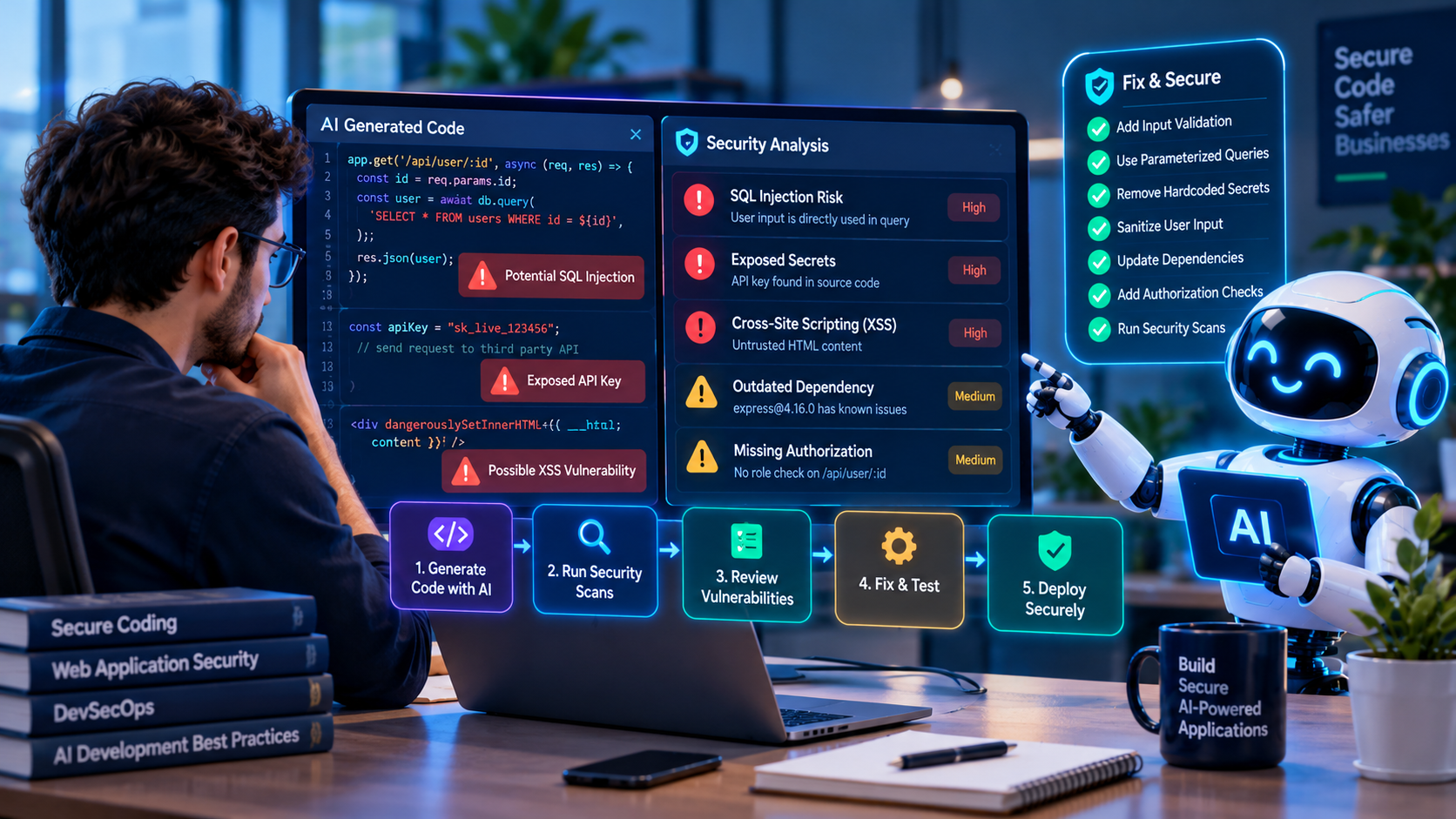
AI coding assistants are changing how developers write, review, and maintain software. They can help generate React components, Node.js APIs, database queries, authentication logic, and automated tests in a fraction of the time required to write every line manually.
However, faster code generation does not automatically mean more secure software. AI-generated code may contain missing authorization checks, unsafe input handling, outdated dependencies, exposed credentials, or insecure configuration. Some problems are easy to spot with automated tools, while others require a developer who understands the application's business logic.
As AI-assisted development becomes part of modern engineering workflows, teams need a reliable process for detecting vulnerabilities before code reaches production.
This guide explains common AI-generated code security risks, practical React and Node.js examples, tools developers can use, and a step-by-step pre-release security workflow.
What Is AI-Generated Code Security?
AI-generated code security refers to the practices used to evaluate, test, and protect source code produced or modified with the assistance of artificial intelligence tools.
These practices include secure code review, static analysis, dependency scanning, secret detection, dynamic testing, authorization verification, and security checks within CI/CD pipelines.
The goal is not to reject AI-generated code. It is to ensure that the code meets the same engineering and security standards expected from manually written software.
Developers should treat generated code as an untrusted contribution until they understand its behavior and verify that it satisfies the application's requirements.
Why Can AI-Generated Code Introduce Security Vulnerabilities?
AI coding tools generate suggestions from the instructions and context available to them. They may produce code that appears functional without fully understanding the application's authentication model, authorization requirements, deployment environment, or data sensitivity.
For example, a developer might ask an AI assistant to create an API endpoint for retrieving customer records. The resulting endpoint may work correctly during testing but fail to verify whether the authenticated user is permitted to access the requested customer's data.
This creates a security problem even though the endpoint returns valid responses.
Other risks include copied insecure patterns, unnecessary packages, weak error handling, missing validation, and code that relies on incorrect assumptions about framework behavior.
AI coding tools can improve productivity, but the developer and organization remain responsible for the security of the released application.
Common Security Vulnerabilities in AI-Generated Code
1. Missing Authentication and Authorization
Authentication verifies who a user is. Authorization determines what that user is allowed to access or modify. AI-generated APIs may implement authentication but overlook object-level or role-based authorization.
Consider an endpoint that retrieves an invoice using an ID supplied in the URL. If the backend only checks that the requester is logged in, one customer may be able to request another customer's invoice by changing the ID.
How to detect it: Review every sensitive endpoint, test access with users from different accounts and roles, and verify authorization on the server for each requested resource.
How to prevent it: Apply server-side permission checks, deny access by default, and create automated tests for unauthorized requests.
2. SQL Injection and Unsafe Database Queries
SQL injection can occur when untrusted input is combined directly with SQL statements. An AI-generated query may appear convenient but introduce a vulnerability if user input becomes part of executable SQL syntax.
Unsafe pattern: Constructing a SQL statement through string concatenation using values received from a request.
Safer approach: Use parameterized queries, prepared statements, and well-maintained database libraries. Validate inputs and enforce database permissions appropriate to the application.
Developers should review query construction carefully, including database operations hidden inside utility functions and generated service layers.
3. Cross-Site Scripting in React Applications
React escapes ordinary text values rendered through JSX, which helps reduce many common cross-site scripting risks. However, applications can still introduce XSS vulnerabilities when they bypass safe rendering patterns or insert untrusted HTML.
One example is using dangerouslySetInnerHTML to display content received from users, external APIs, or AI-generated responses without appropriate sanitization.
How to detect it: Search the codebase for dangerouslySetInnerHTML, direct DOM manipulation, unsafe URL handling, and HTML strings originating from untrusted sources.
How to prevent it: Prefer normal JSX text rendering. When HTML rendering is genuinely required, use a suitable sanitization library and apply appropriate content security controls.
4. Hardcoded API Keys and Secrets
AI-generated examples sometimes include placeholder credentials or suggest configuration patterns that could expose secrets if copied into production code.
Private API keys, database passwords, signing secrets, and service credentials should not be embedded in frontend JavaScript or committed to source control.
In React and Vite applications, variables intentionally exposed to the browser must never contain confidential server credentials.
How to detect it: Scan source files, configuration files, commit history, and build outputs for credential patterns.
How to prevent it: Store sensitive credentials in approved server-side environment or secret-management systems. Rotate credentials immediately if exposure is confirmed.
5. Vulnerable or Unnecessary Dependencies
AI coding tools may recommend packages without verifying their maintenance status, provenance, licensing requirements, or known vulnerabilities. They may also suggest package names that are incorrect or do not exist.
How to detect it: Review dependency changes, inspect package maintainers and release history, use software composition analysis, and check vulnerability advisories.
How to prevent it: Install only necessary dependencies, use lockfiles, review package installation scripts, and apply security updates after testing compatibility.
6. Insecure File Upload Handling
Generated upload endpoints may accept files without appropriate restrictions on size, type, storage location, or access permissions.
Unsafe file handling can expose systems to malicious uploads, resource exhaustion, or unauthorized access to stored content.
How to detect it: Review upload validation, file storage permissions, generated filenames, download responses, and error handling.
How to prevent it: Enforce size limits, verify allowed file formats, generate safe filenames, store files outside executable locations where appropriate, and restrict access.
7. Server-Side Request Forgery
Server-side request forgery can occur when an application fetches attacker-controlled URLs without sufficient restrictions. An AI-generated backend function that accepts arbitrary URLs may expose internal services or sensitive network resources.
How to detect it: Identify functions that make outbound HTTP requests using URLs influenced by users or external content.
How to prevent it: Use strict destination allowlists where possible, block access to internal and metadata endpoints, validate redirects, and apply network-level restrictions.
8. Weak Error Handling and Information Disclosure
Generated applications may return detailed exception messages, database errors, stack traces, or internal configuration information to clients.
These details can help attackers understand the application's internal structure.
How to prevent it: Return controlled error responses to users, log relevant diagnostic information securely, and ensure logs do not expose credentials or unnecessary personal data.
React Security Example: Rendering Untrusted Content
Suppose an AI assistant generates a React component that displays a blog description returned by an API.
Potentially unsafe approach:
<div dangerouslySetInnerHTML={{ __html: description }} />If description contains untrusted HTML, this pattern can introduce an XSS risk.
Safer approach when HTML is not required:
<div>{description}</div>React renders the value as text rather than interpreting it as HTML.
If rich HTML is required, the application should sanitize it using a suitable, maintained HTML sanitization library and apply a security policy appropriate to the content source.
This example demonstrates why developers must understand the purpose and trust level of every generated component rather than accepting it simply because the interface works.
Node.js Security Example: Preventing SQL Injection
Consider an Express application that retrieves customer information using a request parameter.
Unsafe example:
const query = 'SELECT * FROM customers WHERE id = ' + req.params.id;Building a query directly from untrusted input can allow SQL injection when the resulting statement is executed.
Safer example using a parameterized query:
const customerId = Number(req.params.id);
if (!Number.isSafeInteger(customerId) || customerId <= 0) {
  return res.status(400).json({ error: 'Invalid customer ID' });
}
const [rows] = await db.execute(
  'SELECT id, name FROM customers WHERE id = ?',
  [customerId]
);
This example uses parameter binding and basic input validation. A production endpoint must also authenticate the requester and verify authorization to access the customer record.
How Developers Can Detect AI-Generated Code Vulnerabilities
Step 1: Review AI-Generated Code Before Merging
Developers should read generated code carefully and understand how it works. Focus on authentication, authorization, data handling, file operations, external requests, database access, and error handling.
Review unfamiliar dependencies and unexpected configuration changes. If a developer cannot explain the security implications of a change, it should not be merged without further investigation.
Step 2: Run Static Application Security Testing
Static application security testing analyzes source code for patterns associated with vulnerabilities. Tools such as CodeQL and Semgrep can help identify potentially unsafe data flows, insecure API usage, and other issues.
Static analysis should run during development and in CI/CD workflows. Findings must be reviewed because scanners can produce false positives and may miss business-logic vulnerabilities.
Step 3: Scan Third-Party Dependencies
Use software composition analysis to identify known vulnerabilities in installed libraries and transitive dependencies.
For Node.js projects, npm audit can help review known dependency advisories. Developers should assess the impact of findings and test updates before deploying them.
A dependency scan does not prove that an application is secure, but it provides important visibility into third-party risks.
Step 4: Detect Exposed Secrets
Use secret scanning to identify accidentally committed credentials, tokens, and private keys. GitHub secret scanning and tools such as Gitleaks can support this process.
If a real credential has been exposed, revoke or rotate it. Simply deleting the credential from the latest source file may not remove it from repository history or prevent misuse.
Step 5: Perform Dynamic Security Testing
Dynamic application security testing examines a running application to identify potential vulnerabilities. Tools such as OWASP ZAP can support authorized security testing of web applications.
Run tests in an environment you control or have permission to assess. Include authentication, authorization, session management, input validation, and error-handling scenarios.
Step 6: Test Business Logic and Access Control
Automated scanners may not understand the intended business rules of an application. Developers must test whether users can access records, perform actions, or change data outside their permissions.
Examples include attempting to access another customer's invoice, changing an order belonging to another account, or calling an administrator endpoint using a normal user session.
Step 7: Verify Production Configuration
Review environment variables, CORS settings, cookie security, HTTPS configuration, database permissions, API rate limits, logging, and deployment secrets.
Production systems should not expose debugging interfaces, development credentials, or unnecessary administrative endpoints.
Security Tools for AI-Assisted Development
- GitHub CodeQL: Static code analysis for identifying selected vulnerability patterns and errors.
- Semgrep: Configurable static analysis for identifying risky code patterns.
- npm audit: Dependency vulnerability checks for Node.js projects.
- GitHub Dependabot: Dependency alerts and update assistance.
- Gitleaks: Detection of potential secrets in source repositories.
- OWASP ZAP: Dynamic testing of web applications in authorized environments.
- ESLint: Code quality and selected security checks when suitable rules and plugins are configured.
No single tool detects every vulnerability. Strong security requires multiple complementary checks and human review.
How to Integrate Security Checks into CI/CD
Security testing becomes more consistent when it is part of the development pipeline instead of a one-time activity immediately before launch.
A practical workflow can include the following stages:
- Developers create a feature or bug fix with or without AI assistance.
- Local linting and automated tests run before the code is committed.
- A pull request triggers static analysis, dependency scanning, and secret scanning.
- Reviewers inspect security-sensitive changes and verify authorization and business logic.
- The application is built and tested in an appropriate staging environment.
- Authorized dynamic tests and release checks are completed.
- Deployment proceeds only after the required checks and approvals pass.
Organizations can define release gates for unresolved critical findings and other risks based on their security policies.
Additional Security Risks in AI-Integrated Applications
When software includes AI models or AI agents at runtime, developers must consider additional risks beyond ordinary application security.
Prompt injection can occur when untrusted content attempts to manipulate an AI system's instructions or tool usage. Unsafe handling of model-generated output can also create vulnerabilities when that output is passed directly into SQL queries, shell commands, HTML rendering, or privileged APIs.
Developers should treat model outputs as untrusted data, validate tool arguments, enforce permissions independently of the model, and avoid allowing generated text to execute as code.
AI applications may also require evaluation of data leakage, excessive agent permissions, unbounded resource consumption, and insecure integrations.
These risks should be assessed separately from vulnerabilities in source code generated by AI coding assistants.
Pre-Release Security Checklist for Developers
Before deploying AI-generated or AI-assisted code, review the following checklist:
- All AI-generated changes have been reviewed and understood.
- Authentication and server-side authorization have been verified.
- External inputs are validated and outputs are handled safely.
- Database queries use safe parameterization where applicable.
- No credentials or private keys are exposed in source code or frontend bundles.
- Dependencies have been reviewed for known vulnerabilities and suspicious packages.
- Static analysis and automated tests have completed successfully.
- Security-sensitive functionality has appropriate manual test coverage.
- File uploads, external requests, and error responses have been reviewed.
- Production environment settings and access permissions have been checked.
- Critical findings have been remediated or formally assessed under the organization's risk policy.
- Logging, monitoring, rollback procedures, and incident-response responsibilities are established.
This checklist is a starting point rather than a complete security certification. The required controls should reflect the application's architecture, data sensitivity, and threat model.
Best Practices for Teams Using AI Coding Assistants
Organizations should establish clear guidelines for how AI coding tools are used in software development.
- Define approved tools: Use AI services that meet organizational security and data-handling requirements.
- Protect sensitive information: Avoid sharing production credentials, confidential customer data, or proprietary material without appropriate authorization and controls.
- Require code ownership: Developers remain accountable for understanding and maintaining generated code.
- Use secure templates: Provide established patterns for authentication, database access, validation, and API development.
- Review dependency changes: Verify every newly introduced package before installation.
- Automate repeatable checks: Run security scanning and testing consistently across pull requests.
- Improve developer training: Teach teams how to recognize security weaknesses that may appear in generated suggestions.
How The Codx Approaches Secure Software Development Requirements
Businesses adopting AI-assisted development need applications that are maintainable, reliable, and designed with security requirements in mind.
At The Codx, software development and system integration projects can be evaluated around the specific needs of the business, including application architecture, API connectivity, data handling, and deployment requirements.
For organizations planning a new web application, mobile platform, or custom software solution, discussing security expectations early helps establish the right development and testing approach.
Explore software development services and discuss your project requirements at The Codx.
Frequently Asked Questions
Is AI-generated code safe to use in production?
AI-generated code can be used in production after appropriate review, testing, and security verification. It should not be assumed secure simply because it compiles or passes functional tests.
What are the most common vulnerabilities in AI-generated code?
Potential problems include missing authorization, unsafe input handling, SQL injection, cross-site scripting, exposed secrets, insecure dependencies, and configuration mistakes. The actual risks depend on the application and generated code.
Can static analysis detect every security vulnerability?
No. Static analysis can identify many patterns, but it may miss business-logic flaws, incorrect permissions, and vulnerabilities that depend on runtime behavior or application context.
How can React developers secure AI-generated components?
React developers should review unsafe HTML rendering, external URLs, authentication assumptions, API interactions, dependency usage, and the handling of sensitive data. Authorization must still be enforced by the backend.
How can Node.js developers check AI-generated backend code?
They should validate inputs, use parameterized database queries, review authentication and authorization, inspect external requests, scan dependencies, protect secrets, and test error handling.
Which tools help identify vulnerabilities before deployment?
CodeQL, Semgrep, dependency scanners, secret scanners, and dynamic testing tools such as OWASP ZAP can help. The best results come from combining tools with security-focused code review and testing.
Should developers trust AI-generated security fixes?
AI-generated fixes should be reviewed and tested like any other code change. A suggested fix may address one issue while introducing a new defect or failing to solve the underlying problem.
Conclusion
AI coding tools can accelerate software development, but they do not replace secure engineering practices. Developers must continue to validate inputs, enforce authorization, protect secrets, review dependencies, and test applications before release.
The most effective approach combines AI-assisted productivity with automated security scanning, meaningful human review, and well-defined deployment controls.
By building security into everyday development workflows, teams can benefit from AI-generated code while reducing the risk of releasing avoidable vulnerabilities.