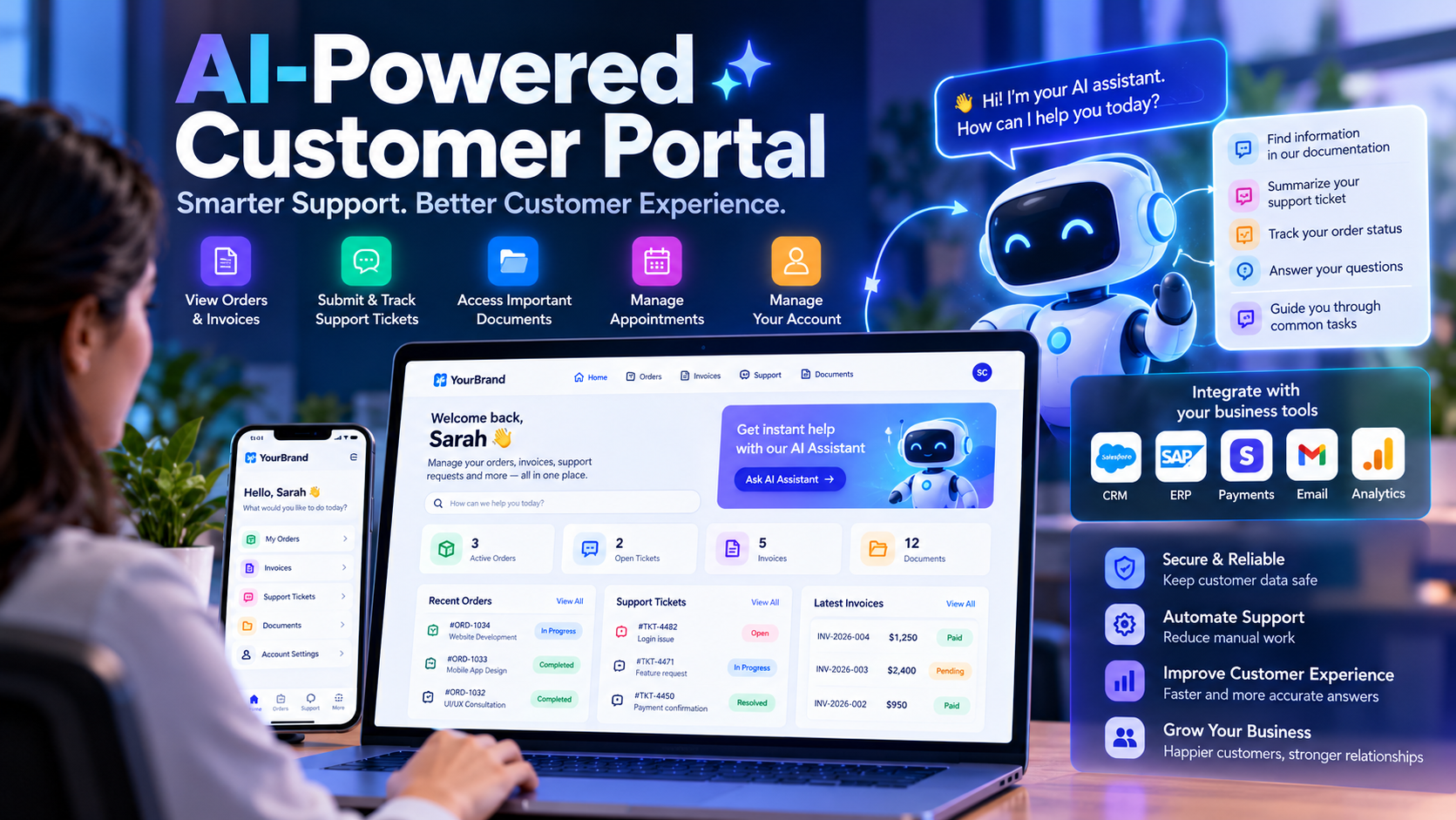
Customers expect more than a website that displays business information. They want to check order status, download invoices, submit support requests, track progress, and find answers without waiting for an email or phone call. For businesses, managing these requests manually can consume valuable time and create inconsistent customer experiences.
An AI-powered customer portal can bring these interactions into one secure online platform. Customers can access their information, manage requests, and receive assistance, while AI features can help answer questions, summarize support cases, and guide users through routine tasks.
In this guide, we explain how to build a customer portal, which features to prioritize, how AI can improve the experience, which technologies to consider, and how to approach security, integrations, testing, and ongoing maintenance.
What Is an AI-Powered Customer Portal?
A customer portal is a private section of a website or application where authenticated customers can access services and information associated with their accounts. Depending on the business, it might include orders, invoices, subscriptions, support tickets, project documents, appointments, or account settings.
An AI-powered customer portal adds selected artificial intelligence capabilities to this experience. For example, an AI assistant might answer questions using approved help documentation, summarize a support conversation, or help customers find the correct form.
AI should enhance the portal rather than replace its core business logic. Account balances, invoices, payment status, order records, and permissions should come from trusted application systems, not from an AI model's guesses.
Why Businesses Need a Customer Portal
When customers rely entirely on emails, calls, and manual updates, information can become fragmented across different teams. A customer portal provides a consistent place to access approved information and manage requests.
- Self-service access: Customers can retrieve available information without contacting staff for every request.
- Better visibility: Users can see the status of requests, orders, projects, or cases where the business supports these features.
- Centralized documents: Invoices, contracts, reports, and other authorized files can be organized in one location.
- More consistent support: Help content and support workflows can guide customers toward the right answer.
- Reduced repetitive work: Automation can assist with routine tasks such as categorization, notifications, and draft responses.
- Improved customer experience: A responsive, accessible portal can make it easier to interact with a business outside normal office hours.
These are potential benefits, not guaranteed outcomes. Results depend on the portal's usability, data quality, integration reliability, and the needs of its customers.
Essential Features of a Modern Customer Portal
1. Secure registration and login
Customers need a reliable way to access their accounts. Depending on the application, authentication may include verified email addresses, password-based login, multi-factor authentication, or an established identity provider.
Account recovery, session expiration, suspicious-login handling, and secure logout should be part of the design. For business-to-business portals, support for company accounts and multiple users may also be required.
2. Personalized customer dashboard
The dashboard should present relevant information immediately after login. Examples include recent activity, outstanding requests, upcoming appointments, available documents, invoices, and important notifications.
Keep the interface focused. Customers should not need to navigate through many pages to find the information they use most frequently.
3. Orders, invoices, and payments
For suitable businesses, the portal can display order history, invoice details, payment status, and downloadable receipts. Payment functionality should use a trusted payment provider and a server-side verification process.
Never treat a browser redirect or a client-side success message as proof that a payment has completed. Confirm the transaction through the payment provider's trusted server-side mechanism before updating business records.
4. Support tickets and communication
Customers should be able to create a support request, attach relevant files, review previous conversations, and see the status of their ticket. Notifications can inform them when a response arrives or additional information is required.
Useful ticket statuses might include Open, In Progress, Waiting for Customer, and Resolved. The exact workflow should reflect how the business operates.
5. Document management
A portal can provide access to contracts, project files, reports, statements, or other business documents. Access must be checked on the server for every request, not only hidden in the user interface.
Use private storage, short-lived download links where appropriate, file-type validation, size limits, and audit logs for sensitive documents.
6. Notifications and reminders
Email, in-app, or optional SMS notifications can inform customers about ticket updates, appointments, invoices, or important account activity. Let users manage non-essential notification preferences and avoid sending unnecessary messages.
7. AI-powered assistance
An AI assistant can help customers search support articles, explain product documentation, summarize long conversations, and identify the next step in a workflow.
For reliable answers, ground the assistant in approved business content and provide links to the relevant source where possible. If it cannot find a supported answer, it should say so and offer an appropriate route to human support.
How AI Can Improve a Customer Portal
AI features should be selected according to actual customer problems. Adding a chatbot without reliable data or a clear use case may create more frustration than value.
AI search across help documentation
Customers can describe their problem in everyday language rather than guessing the exact keyword used in a help article. A retrieval-based system can find relevant approved documents and generate a concise explanation grounded in those sources.
Automated ticket classification
AI can suggest categories, priority levels, or the team that should handle a support request. These suggestions can speed up triage, but urgent or sensitive cases should follow explicit rules and escalation paths.
Conversation summaries
When a support case contains many messages, AI can prepare a summary of the issue, previous troubleshooting steps, and unresolved questions. Support staff should be able to inspect the original conversation and correct inaccurate summaries.
Personalized guidance
With suitable permissions, the portal can use the customer's product type, service plan, or current workflow to display relevant help. Personalization should be based on verified account data and should not expose information belonging to another customer.
AI-assisted workflows
An assistant may help users prepare a support request, collect required details, or navigate a multi-step process. Actions that change account information, issue refunds, approve documents, or affect payments should use explicit authorization and confirmation controls.
Step-by-Step: How to Build an AI-Powered Customer Portal
Step 1: Identify the business requirements
Start by documenting the problems the portal should solve. Interview customers and internal teams to understand the most common requests, information customers need, and processes that currently require manual effort.
Define the primary user groups, expected workflows, required integrations, data sensitivity, accessibility needs, and success measures. Avoid building every possible feature in the first release.
Step 2: Map user journeys and permissions
Create user journeys for registration, login, dashboard access, document downloads, support requests, and other core tasks. Define what each user can view and change.
For a business portal, roles might include Customer, Customer Administrator, Support Agent, and Internal Administrator. A role alone may not be sufficient: the system may also need to verify the user's organization, account ownership, or relationship to a particular record.
Step 3: Design the user interface
Build a responsive interface that works on desktop, tablet, and mobile devices. Use clear navigation, readable typography, accessible forms, helpful validation messages, and consistent loading and error states.
Prioritize the most common tasks. A customer should be able to find an invoice, create a ticket, or check request status without navigating an unnecessarily complicated interface.
Step 4: Choose the technology stack
Select technologies based on the team's experience, performance requirements, integrations, deployment environment, and long-term maintenance needs.
- Frontend: React, Next.js, Vue, or another framework suitable for the required user experience.
- Backend: Node.js with Express, .NET, Django, Spring Boot, or another server framework that supports the application's business logic.
- Database: PostgreSQL or MySQL for structured customer, invoice, ticket, and relationship data. Document databases may be appropriate for specific use cases.
- Authentication: An established identity provider or a carefully implemented authentication system with secure session management.
- File storage: Private object storage or a controlled document service with authorization checks.
- AI integration: A model API, approved enterprise AI service, or a retrieval-based application architecture selected according to privacy and performance requirements.
- Hosting: A suitable cloud platform or managed application environment with monitoring, backups, and a deployment process.
There is no single best stack for every customer portal. Prefer technologies that the team can operate securely and maintain reliably.
Step 5: Design the backend API
The backend should expose clear endpoints for supported portal operations. Example endpoint groups might include:
GET /api/me— retrieve the authenticated user's profile.GET /api/me/orders— list orders that the current user is allowed to access.GET /api/me/invoices— retrieve authorized invoice summaries.GET /api/me/tickets— list the user's support requests.POST /api/me/tickets— create a support request.POST /api/assistant/messages— submit a message to the AI assistant.
These are illustrative routes, not a complete implementation. Every endpoint must authenticate the request where required, validate inputs, enforce object-level permissions, and return only authorized data.
Step 6: Create the data model
A relational design might include the following entities:
- Users: Identity, account status, and authentication-provider references.
- Organizations: Company accounts for business-to-business portals.
- Memberships: Relationships between users and organizations, including assigned roles.
- Orders: Order details and status.
- Invoices: Invoice references, amounts, due dates, and payment status.
- SupportTickets: Ticket subject, status, category, and assigned team.
- TicketMessages: Conversation messages and timestamps.
- Documents: Metadata and references to private stored files.
- AuditEvents: Relevant security and business actions.
Use foreign keys and appropriate constraints where supported. Store only the information the application needs, and define retention and deletion rules for personal data.
Step 7: Integrate existing business systems
Many organizations already use a CRM, ERP, billing platform, help desk, or project management system. Decide which system is the source of truth for each type of data before building integrations.
Use documented APIs, secure service credentials, timeouts, retries, and idempotency for operations where duplicate processing would cause problems. Webhooks should be authenticated and validated, and sensitive integration failures should be monitored.
Avoid creating multiple independent records for the same invoice or customer unless the architecture explicitly supports synchronization between them.
Step 8: Add the AI layer
For an initial version, use a narrow AI feature such as searching approved help articles or drafting a support response. A retrieval-augmented generation (RAG) architecture can retrieve relevant passages from a controlled knowledge base and supply them as context to a language model.
A typical flow is:
- The customer submits a question.
- The application checks the user's session and permissions.
- The retrieval layer searches only the content the user is allowed to access.
- The model generates a response using the retrieved content.
- The application presents the answer with relevant sources and a human-support option when needed.
Do not allow the model to decide access permissions. Enforce authorization in the application and retrieval layer before private information reaches the model. Treat uploaded documents and retrieved content as untrusted input, and test for prompt injection and data leakage.
Step 9: Test before launch
Test the portal on supported browsers and screen sizes. Validate registration, password recovery, session expiration, role permissions, file uploads, payment flows, notifications, and third-party integrations.
Security testing should include attempts to access another customer's records by changing identifiers, unauthorized document downloads, privilege escalation, abusive API requests, and leakage of secrets or personal data through logs.
For AI features, test incorrect answers, unsupported questions, malicious instructions, sensitive information requests, and graceful handoff to human support.
Step 10: Deploy, monitor, and improve
Launch a limited pilot before expanding to all customers. Monitor performance, failed requests, user feedback, support deflection, AI answer quality, and operational cost.
Maintain backups, test recovery procedures, update dependencies, review access permissions, and establish an incident-response process. Use actual customer feedback to prioritize improvements rather than adding features without evidence of demand.
Recommended Architecture for a Customer Portal
A maintainable portal usually separates the presentation layer, backend application, identity system, database, file storage, business integrations, and AI service.
- Customer interface: Responsive web application.
- Identity layer: Authentication, session management, and identity verification.
- Backend API: Business rules, validation, authorization, and workflow orchestration.
- Data layer: Customer records, tickets, invoices, and related metadata.
- Integration layer: CRM, ERP, billing, notification, and support systems.
- AI layer: Retrieval, model requests, output validation, and safe tool access.
- Operations: Logging, monitoring, alerting, backups, and audit trails.
For an early product, these components may be deployed together in a well-structured application. As requirements grow, specific components can be separated when there is a clear operational or scaling benefit.
Security Best Practices for Customer Portals
Customer portals frequently contain personal information, financial documents, private conversations, or business records. Security must be part of the architecture from the beginning.
- Enforce server-side authorization: Verify ownership or organizational access for every protected record and file.
- Use secure authentication: Apply appropriate multi-factor authentication, secure sessions, and account-recovery protections.
- Protect APIs: Validate input, restrict sensitive operations, apply rate limits, and avoid exposing internal details in error responses.
- Use HTTPS: Protect data in transit and configure secure cookie and browser policies.
- Keep secrets out of source code: Use managed secrets or protected environment configuration and rotate credentials when needed.
- Secure file handling: Restrict file types and sizes, scan uploads where appropriate, and store private documents outside publicly accessible paths.
- Log important events: Record security-relevant activity while avoiding unnecessary sensitive data in logs.
- Secure AI features: Restrict the information supplied to models, validate outputs, and require confirmation for consequential actions.
- Maintain dependencies: Apply updates and run automated security checks as part of the development process.
The OWASP API Security Top 10 is a useful reference for risks such as broken authentication, broken object-level authorization, and unrestricted resource consumption. Review the official guidance during design and security testing.
How Much Does Customer Portal Development Cost?
The cost depends on scope, design complexity, integrations, compliance needs, AI capabilities, and ongoing support. A simple portal with secure login and document access is very different from a multi-organization platform connected to several enterprise systems.
Rather than relying on a generic price estimate, request a scoped proposal that separates implementation and ongoing costs.
| Project type | Typical scope | Factors affecting cost |
|---|---|---|
| Basic portal | Login, dashboard, profile, and limited document access | Authentication, design, data migration, and hosting |
| Business portal | Tickets, notifications, account records, and system integrations | Workflow complexity, API integrations, permissions, and testing |
| AI-powered portal | AI search, support assistance, summaries, and selected automations | Model usage, knowledge preparation, evaluation, safeguards, and monitoring |
| Enterprise portal | Multiple organizations, advanced roles, extensive integrations, and audit requirements | Compliance, migration, availability, security reviews, and operational support |
Budget for ongoing hosting, database services, AI usage, monitoring, maintenance, security updates, backups, and future feature development. A low initial development price does not necessarily mean a lower long-term cost.
How to Measure Portal Success
Choose a small set of metrics that reflect the problem the portal was designed to solve.
- Self-service completion rate: Percentage of users who complete common tasks without additional assistance.
- Support resolution time: Time required to resolve support requests before and after launch.
- Customer satisfaction: Feedback collected after key tasks or support interactions.
- Portal adoption: Number of active customers and frequency of meaningful use.
- AI answer quality: Accuracy, source relevance, escalation rate, and frequency of unsupported responses.
- Reliability: Availability, response time, and error rate for key workflows.
- Cost per completed task: Total operating cost divided by the number of successfully completed tasks.
Establish a baseline before launch and compare results over time. These measurements help identify which features deliver real value and which need improvement.
Frequently Asked Questions
1. What is an AI-powered customer portal?
It is a secure online platform where customers access account information and services, enhanced with AI capabilities such as knowledge search, support assistance, summarization, or guided workflows.
2. How do I build a customer portal for my business?
Start by defining customer needs, mapping workflows and permissions, selecting a technology stack, building the backend and data model, integrating existing systems, and testing security and usability. Add AI features only where they solve a clear problem.
3. Which technology is best for customer portal development?
There is no universal best stack. React or Next.js can be suitable for the frontend, while Node.js, .NET, Django, or Spring Boot can support the backend. Choose based on integrations, team skills, security requirements, and maintenance needs.
4. Can AI answer customer questions automatically?
AI can answer many routine questions when it has reliable, relevant source material. Provide citations or source links where possible, evaluate answer quality, and offer human escalation when information is missing or the issue is sensitive.
5. How can I keep customer portal data secure?
Use secure authentication, server-side access controls, encrypted connections, private file storage, input validation, rate limiting, audit logging, dependency updates, and regular security testing. Ensure AI integrations follow the same data-access policies.
6. Can a customer portal integrate with an existing CRM or ERP?
Yes, when the existing platform provides a suitable API or integration mechanism. Identify the system of record for each data type and implement secure synchronization, retries, error handling, and monitoring.
7. Should a business build a custom portal or use existing software?
Existing software may be appropriate when its features match the business process. Custom development can make sense when the business needs specialized workflows, branding, integrations, or control over the customer experience. Compare total cost, flexibility, security, and ongoing maintenance.
8. How long does it take to develop a customer portal?
Timelines depend on the scope, integrations, data migration, design, security reviews, and AI requirements. A focused first release is generally easier to plan than a large platform with many complex workflows. Estimate the timeline after requirements and dependencies have been reviewed.
Conclusion
An AI-powered customer portal can give customers a more convenient way to access information, manage requests, and receive assistance. For businesses, it can create a consistent service experience and reduce selected repetitive tasks.
The strongest solutions begin with useful core features: secure login, a clear dashboard, reliable records, support workflows, and well-designed integrations. AI should then be introduced for specific tasks such as searching approved documentation, summarizing conversations, or guiding customers through a process.
Security, authorization, testing, and ongoing measurement are essential. AI must not replace trusted business records or bypass permissions. By starting with a focused use case and expanding based on evidence, businesses can build a customer portal that is practical, maintainable, and ready to evolve.
Official Resources
- Google Search Central: Creating helpful, reliable, people-first content
- OWASP API Security Project: API Security Top 10
- Microsoft Azure Architecture Center: Basic web application
- Microsoft Learn: Identity architecture and access management
About The Codx
The Codx shares practical insights on web development, custom software, AI, cloud computing, cybersecurity, and digital transformation to help businesses make informed technology decisions.