
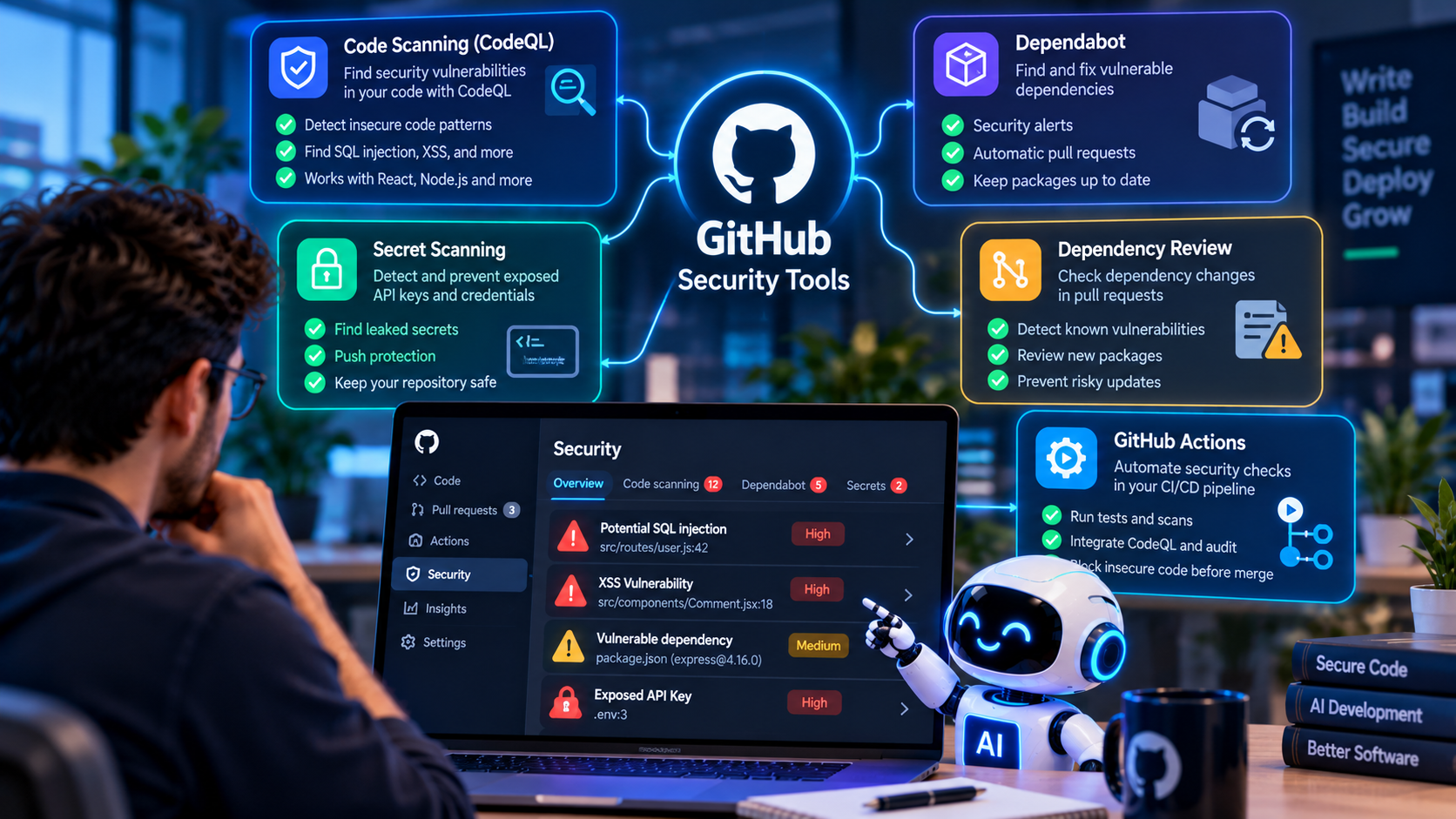
AI coding assistants can help developers generate React components, Node.js APIs, database queries, tests, and entire application features. This can accelerate software development, but generated code still needs security verification before it reaches production.
A function may work correctly while containing an authorization flaw. A new package may introduce a known vulnerability. A configuration file may accidentally expose an API key. These issues can be difficult to identify through functional testing alone.
GitHub provides security tools that help developers identify several categories of these risks. Code scanning can analyze source code, Dependabot can identify vulnerable dependencies, and secret scanning can detect exposed credentials. GitHub Actions can connect these checks to the development workflow.
In this guide, we explain how to use these tools to review AI-generated code and establish a practical security process for React, Node.js, and other supported projects.
Why AI-Generated Code Needs Security Testing
AI-generated code is not automatically secure simply because it compiles, passes a few tests, or follows familiar programming patterns.
A coding assistant may not know every detail of an application's access-control rules, deployment environment, data sensitivity, or threat model. It may suggest an outdated dependency, overlook input validation, or create an endpoint that does not verify resource ownership.
For example, a generated Node.js endpoint might return customer information after checking only whether a user is logged in. If it does not verify that the user is authorized to access the requested customer record, the endpoint may expose private data.
Security testing should therefore be part of the normal development process for all code, whether it was written manually or with AI assistance.
GitHub Security Tools Developers Should Know
1. GitHub Code Scanning and CodeQL
GitHub code scanning can identify potential vulnerabilities and coding errors in supported source code. CodeQL analyzes code using queries that identify patterns associated with security problems.
Depending on the language and available analysis, findings may include unsafe data flows, injection risks, and other security weaknesses. Results appear as alerts that developers can review and address.
Code scanning is particularly useful when AI generates new functions, modifies existing APIs, or changes security-sensitive code.
Learn more: GitHub code scanning documentation.
2. Dependabot
AI coding assistants may recommend packages without fully assessing their maintenance status or known security issues. Dependabot helps developers identify vulnerable dependencies and, where supported, create pull requests to update them.
For a JavaScript project, dependencies can be declared directly in package.json or indirectly through other packages. Both direct and transitive dependencies should be considered when reviewing the software supply chain.
Dependabot alerts identify known vulnerabilities; they do not guarantee that every dependency or package is safe.
Learn more: Dependabot alerts documentation.
3. Secret Scanning and Push Protection
Generated code or configuration changes may accidentally include API keys, database credentials, access tokens, or other secrets.
GitHub secret scanning can identify supported secret patterns in repositories. Push protection can help prevent supported secrets from being committed and pushed in the first place, where the feature is available and enabled.
Developers should keep private credentials on the server or in an approved secret-management system. Frontend environment variables that are bundled into browser JavaScript must not contain confidential server-side keys.
If a real secret is exposed, revoke or rotate it promptly. Removing it from the latest commit alone may not eliminate exposure from repository history.
Learn more: GitHub secret scanning documentation.
4. Dependency Review
Dependency review helps developers examine dependency changes introduced by a pull request and identify known vulnerabilities in the proposed packages or versions.
This is useful when AI suggests a new library, changes package versions, or modifies the lockfile. Reviewers can evaluate whether the dependency is necessary and whether the proposed version introduces known risks.
Availability depends on repository type and the applicable GitHub plan or security features.
Learn more: GitHub dependency review documentation.
5. GitHub Actions
GitHub Actions can run automated checks when developers push changes or open pull requests. A workflow can run tests, execute security scans, and report results before code is merged.
For example, a Node.js repository can run its test suite and dependency checks on every pull request. A supported code-scanning workflow can also analyze the code and publish security alerts.
Automated workflows improve consistency, but they must be configured correctly and should use trusted actions, appropriate permissions, and protected secrets.
Learn more: GitHub Actions documentation.
Step 1: Review Your Repository's Security Settings
Start by opening your GitHub repository and checking which security features are available for your project.
- Open the repository on GitHub.
- Select Settings and locate the Security or Advanced Security section.
- Review available code-scanning, secret-scanning, and dependency-security options.
- Enable supported features according to your repository type, plan, and organization policy.
- Open the Security tab to review existing alerts and recommendations.
GitHub feature availability differs between public and private repositories and depends on the applicable plan. Check the current documentation rather than assuming every feature is included for every repository.
Step 2: Enable Code Scanning
Code scanning helps identify potential vulnerabilities in source code. GitHub provides default and advanced configuration options for eligible repositories.
For a supported repository, default setup may be the simplest starting point because GitHub manages much of the configuration. Advanced setup provides more control over the analysis workflow and query configuration.
To get started:
- Open the repository's Settings.
- Navigate to the code security settings.
- Find CodeQL or code scanning.
- Choose an available setup option.
- Complete the configuration and allow the first analysis to run.
- Open the Security tab and review the resulting alerts.
CodeQL supports selected languages and frameworks. Confirm that your repository's languages are supported and that the selected setup matches the project.
Reference: Configure default setup for code scanning.
Step 3: Enable Dependabot Alerts
Dependency vulnerabilities can affect applications even when the application code itself has been written correctly. A vulnerable package may introduce a weakness into an otherwise well-designed system.
To review dependency security:
- Open your repository's security settings.
- Check whether Dependabot alerts are available and enabled.
- Review the dependency graph and existing alerts.
- Inspect the affected package, vulnerable version range, and recommended update.
- Test any dependency update before merging it into the production branch.
For JavaScript projects, run the following command locally as an additional check:
npm auditThis command checks installed dependency information against known advisories available to npm. Review the output before deciding whether to update packages. Do not apply force upgrades blindly, because major version changes can break compatibility.
Reference: Dependabot quickstart guide.
Step 4: Scan for Exposed Secrets
AI-generated code may include placeholders that developers accidentally replace with real credentials. Other risks occur when configuration files, test files, or example scripts contain actual secrets.
Check for:
- API keys and access tokens.
- Database connection credentials.
- Private signing keys and certificates.
- Cloud service credentials.
- Credentials accidentally committed in configuration files.
Enable supported secret-scanning features and push protection where available. Developers can also use local secret-scanning tools as an additional layer of protection.
Never commit a real secret merely to test whether scanning works. Use documented test credentials or a safe test procedure.
Reference: About secret scanning.
Step 5: Review AI-Generated React Code
React applications need special attention when generated code handles HTML, URLs, authentication state, or API responses.
One area to review is dangerouslySetInnerHTML. React escapes ordinary text rendered through JSX, but inserting untrusted HTML can introduce cross-site scripting risks.
Potentially unsafe pattern:
<div dangerouslySetInnerHTML={{ __html: apiResponse }} />When the application only needs to display text, a safer pattern is:
<div>{apiResponse}</div>If rich HTML is required, sanitize it with an appropriate maintained library and review the source of the content. Static scanning may flag suspicious patterns, but developers must verify whether the content can actually be controlled by an attacker.
Also review client-side routes and API calls. Hiding a button in React does not replace authorization checks on the backend.
Step 6: Review AI-Generated Node.js APIs
Node.js and Express applications often handle authentication, database operations, file uploads, and external requests. AI-generated endpoints should be reviewed for unsafe query construction and missing authorization.
For example, concatenating untrusted values into SQL statements can introduce SQL injection risks. Use parameterized queries and validate request data.
Developers should also verify that each sensitive endpoint:
- Authenticates the requester when required.
- Checks permissions for the requested resource.
- Validates input and rejects unexpected values.
- Limits file uploads and restricts file handling.
- Avoids exposing internal errors or sensitive information.
- Uses secure configuration and appropriate rate limits.
CodeQL and other static-analysis tools can identify some relevant patterns, but no scanner guarantees detection of every authorization or business-logic flaw.
Step 7: Add Security Checks to GitHub Actions
Automating security checks in pull requests helps developers discover problems before changes are merged. A practical workflow combines application tests, dependency checks, secret scanning, and code scanning.
For a basic Node.js project, a test workflow might begin with the following YAML:
name: Node.js Security Checks

on:
  pull_request:
  push:
    branches: [main]

permissions:
  contents: read

jobs:
  test-and-audit:
    runs-on: ubuntu-latest
    steps:
      - name: Checkout repository
        uses: actions/checkout@v4

      - name: Set up Node.js
        uses: actions/setup-node@v4
        with:
          node-version: '22'
          cache: npm

      - name: Install dependencies
        run: npm ci

      - name: Run tests
        run: npm test --if-present

      - name: Audit dependencies
        run: npm audit
This is an illustrative starting point, not a complete security pipeline. Verify the supported Node.js version for your application, pin third-party actions to trusted versions or commit SHAs according to your security policy, and configure suitable permissions for each job.
The npm audit step can fail when advisories are reported, so teams should define how findings are reviewed and remediated. Do not disable failing security checks simply to make a workflow green.
CodeQL scanning requires its own supported setup or workflow. Enabling the workflow above does not automatically enable CodeQL, secret scanning, or Dependabot.
Official reference: Configure advanced code-scanning setup.
Step 8: Understand and Fix Security Alerts
When a scan produces an alert, review its description, severity, affected code, and suggested remediation. Determine whether the issue is exploitable in the actual application context.
A useful remediation process is:
- Identify the affected function, dependency, or configuration.
- Understand the root cause and possible impact.
- Prepare a fix using a trusted implementation pattern.
- Add or update tests to prevent regression.
- Run the relevant scans and application tests again.
- Document any accepted residual risk according to the organization's policy.
AI tools may help explain a finding or suggest a fix, but the resulting code must be reviewed and tested. A generated fix can introduce a different vulnerability or fail to address the underlying issue.
Can GitHub Copilot Help Fix Security Vulnerabilities?
GitHub Copilot can assist developers in understanding code, exploring potential attack surfaces, and generating suggested changes. GitHub also offers security-related features such as Copilot Autofix for eligible code-scanning alerts.
Availability depends on the relevant product, repository, and plan. AI-generated remediation should be treated as a proposal, not as proof that a vulnerability has been eliminated.
Developers should review the patch, add appropriate tests, rerun security checks, and verify that the change preserves expected application behavior.
Reference: GitHub's security best practices with Copilot.
What GitHub Security Tools Cannot Guarantee
Security scanning is an important layer of defense, but it does not replace a complete security process.
- Static analysis may miss business-logic flaws or issues that depend on runtime behavior.
- Dependency scanners identify known advisories and may not detect every malicious or compromised package.
- Secret scanning detects supported patterns and may not identify every type of credential.
- Passing automated checks does not prove that authentication and authorization are implemented correctly.
- AI-generated fixes may be incomplete or incorrect.
For higher-risk applications, combine automated scanning with manual review, threat modeling, security testing, monitoring, and an appropriate incident-response process.
Pre-Release Security Checklist
- Review all AI-generated code before merging.
- Enable supported code scanning and inspect findings.
- Review dependency alerts and update vulnerable packages safely.
- Enable secret scanning and push protection where available.
- Verify authentication and server-side authorization.
- Test input validation, file handling, and output encoding.
- Run application tests and security checks in CI/CD.
- Verify production secrets and configuration.
- Review the permissions of GitHub Actions workflows.
- Test security fixes and document unresolved risks.
How The Codx Can Help with Secure Software Development
Secure software development requires more than generating code quickly. Businesses need appropriate architecture, reliable integrations, dependency management, testing, and release controls.
The Codx works across software development and digital solutions. Organizations planning web applications, backend APIs, or custom business systems can assess their security requirements early and select suitable development and testing practices for the project.
To discuss your software development requirements, visit The Codx website.
Frequently Asked Questions
Which GitHub tool detects vulnerabilities in source code?
GitHub code scanning, including CodeQL for supported languages, can identify potential vulnerabilities and coding errors. Results depend on language support, configuration, and the types of issues being analyzed.
Can Dependabot scan AI-generated code?
Dependabot focuses on dependency security and updates. It can identify known vulnerabilities in packages used by an application, regardless of whether the dependency was selected by a developer or suggested by AI.
How do I detect API keys in a GitHub repository?
Enable GitHub secret scanning and push protection where available. You can also use suitable local secret-scanning tools. If a real credential is exposed, revoke or rotate it and investigate its exposure.
Are GitHub security tools free?
Availability varies by feature, repository visibility, account type, and plan. Some features are available for public repositories, while certain capabilities for private repositories require paid security products. Check the current GitHub documentation for the applicable terms.
Does passing CodeQL mean my application is secure?
No. A successful scan means that the configured analysis did not report certain detectable issues. It does not prove the absence of vulnerabilities. Manual review, testing, and suitable operational controls are still necessary.
Can AI-generated security fixes be trusted automatically?
No. Review generated fixes, test the affected functionality, and rerun relevant scans before merging. Security remediation requires verification.
Conclusion
AI coding assistants can accelerate development, but they should be used alongside reliable security practices. GitHub code scanning, Dependabot, secret scanning, and GitHub Actions provide useful ways to detect and address several categories of risk before release.
The most effective workflow combines automated checks with developer judgment. Review generated code, validate permissions, test security-sensitive behavior, and verify fixes before deploying changes to production.
By making security checks part of everyday development, teams can benefit from AI-assisted coding while reducing avoidable software vulnerabilities.