
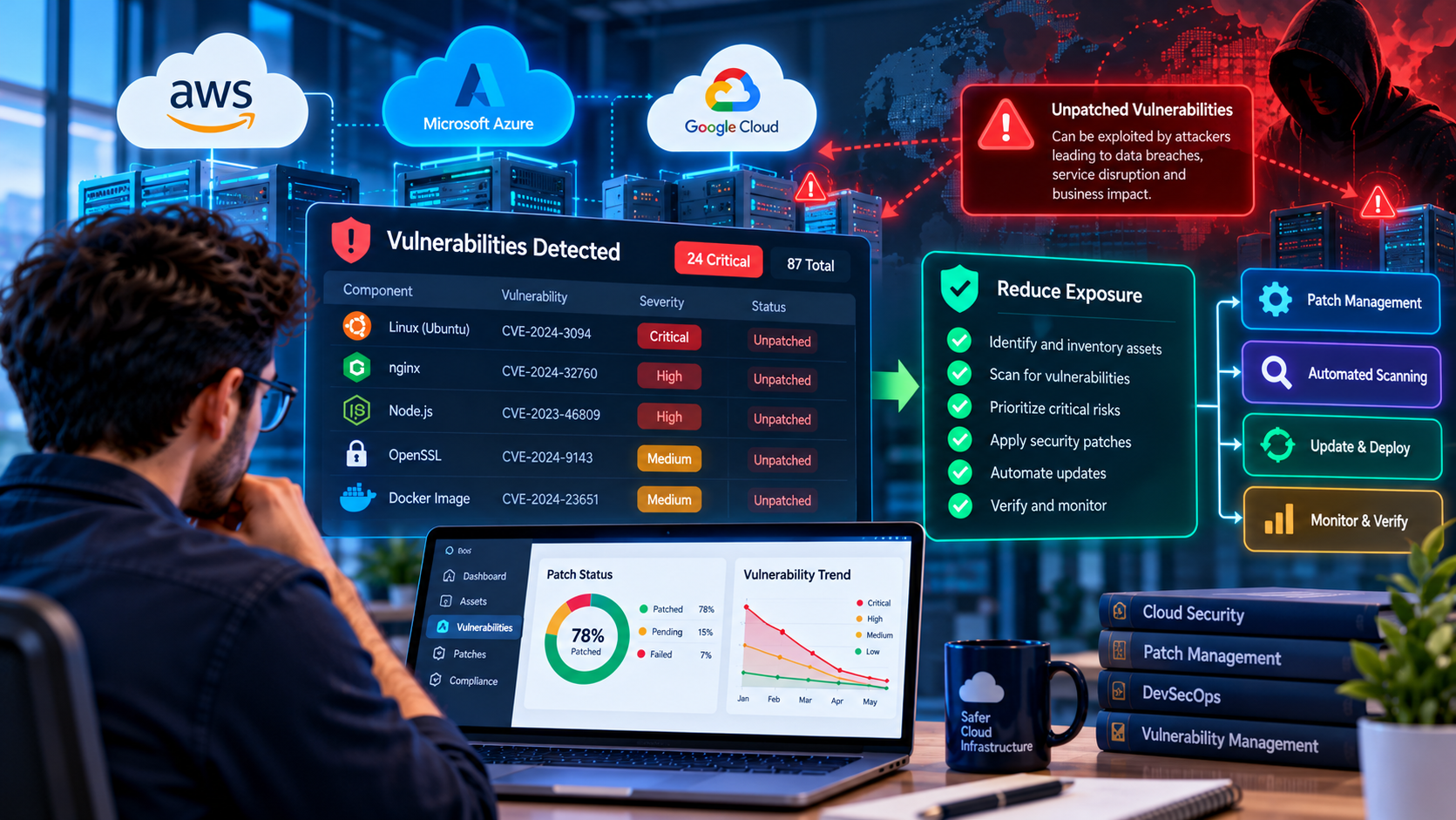
Cloud infrastructure helps businesses deploy applications quickly, scale resources, and manage distributed workloads. However, cloud adoption does not eliminate traditional software security risks. Operating systems, application frameworks, container images, libraries, and exposed services can still contain vulnerabilities that attackers may exploit.
When security updates are delayed, an organization may continue running software with publicly documented weaknesses. The risk can increase when vulnerable services are internet-accessible, credentials are exposed, or attackers can move between connected systems.
For cloud teams, reducing exposure requires more than installing updates occasionally. It requires accurate asset inventory, continuous vulnerability assessment, risk-based prioritization, reliable patch deployment, and verification that remediation has worked.
This guide explains how unpatched vulnerabilities affect cloud environments and provides practical strategies for reducing exposure across AWS, Microsoft Azure, and other cloud platforms.
What Are Unpatched Software Vulnerabilities?
A software vulnerability is a weakness in software, configuration, or system design that can affect confidentiality, integrity, or availability. A vulnerability is considered unpatched when a required security fix has not been applied to the affected software or the system has not otherwise been remediated.
Security updates may be available for operating systems, web servers, databases, application frameworks, container images, and third-party libraries. If an organization delays applying an appropriate fix, affected systems may remain exposed.
Not every vulnerability creates the same level of risk. Some require local access or unusual conditions, while others can be exploited remotely. Exposure also depends on whether the affected component is reachable, how it is configured, and what permissions it has.
Cloud teams should therefore assess vulnerabilities in the context of their actual environment instead of treating every alert as equally urgent.
Why Unpatched Vulnerabilities Are a Cloud Security Risk
1. Internet-Exposed Services Can Be Targeted
Public-facing web servers, APIs, remote administration interfaces, and other services may be reachable by external users. When these services run vulnerable software, attackers may attempt to exploit known weaknesses.
Examples include an outdated web server, a vulnerable application framework, or an exposed management service. Actual exploitability depends on the specific vulnerability, software version, configuration, and surrounding controls.
Risk reduction: Identify internet-facing assets, remove unnecessary public access, restrict management interfaces, and prioritize relevant vulnerabilities on exposed systems.
2. Compromised Applications Can Expose Sensitive Data
A vulnerable application may provide an entry point for unauthorized access to customer information, business records, or internal services. The impact can be greater when the application has excessive database permissions or access to sensitive cloud resources.
Risk reduction: Apply least-privilege access, isolate application components, protect credentials, and ensure that a compromised service cannot automatically access every resource in the environment.
3. Vulnerable Dependencies Can Affect Multiple Applications
Modern applications rely on open-source packages, frameworks, container base images, and other third-party components. A vulnerability in one dependency can affect several services if they use the same vulnerable version.
Developers may not realize that an application contains an affected component because the dependency is installed indirectly through another package.
Risk reduction: Maintain dependency inventories, scan direct and transitive packages, monitor security advisories, and test updates promptly.
4. Containers and Machine Images Can Preserve Old Vulnerabilities
Containers make application deployment consistent, but they can also distribute outdated operating system packages and libraries across multiple environments.
Updating a package in the original image does not automatically replace containers that are already running. Likewise, launching new instances from an outdated machine image can reintroduce a vulnerability.
Risk reduction: Rebuild images from maintained base images, scan them before deployment, replace affected workloads, and retire obsolete images and instances.
5. Delayed Patching Can Increase Business Impact
When a vulnerability becomes publicly known, security teams may need to respond quickly to determine which assets are affected. Delays in asset discovery, ownership assignment, testing, or deployment can leave vulnerable systems exposed for longer.
Risk reduction: Define remediation deadlines based on risk, automate inventory and alerting, and establish an emergency patch process for actively exploited or otherwise critical vulnerabilities.
Common Sources of Unpatched Vulnerabilities in Cloud Environments
- Virtual machines: Outdated operating systems, web servers, runtime environments, and installed packages.
- Containers: Vulnerable base images, outdated packages, and images that have not been rebuilt.
- Application dependencies: Vulnerable npm, Python, Java, PHP, or other ecosystem packages.
- Managed services: Customer-managed software, configuration, or components that still require action even when the cloud provider manages the underlying infrastructure.
- Serverless applications: Outdated application dependencies and runtime configurations that require customer attention.
- Network and management software: Outdated gateways, appliances, agents, and administration tools.
- Abandoned assets: Forgotten test servers, old container images, unused virtual machines, and applications without clear ownership.
Cloud responsibility models vary by service. A provider may maintain the physical infrastructure and some underlying components, while the customer remains responsible for application code, access policies, dependencies, or guest operating systems.
Teams should confirm which party is responsible for each component rather than assuming that every software layer is patched automatically.
How to Prioritize Vulnerabilities Effectively
Cloud environments can generate more vulnerability findings than teams can remediate immediately. Prioritization helps direct attention to the issues most likely to cause meaningful harm.
1. Check the Severity and Available Exploit Information
Review the vulnerability's severity score, technical details, affected versions, available fixes, and any credible evidence of exploitation. A Common Vulnerabilities and Exposures identifier, or CVE, can help teams locate authoritative information about a specific issue.
The Common Vulnerability Scoring System, or CVSS, provides a standardized way to communicate vulnerability severity. A CVSS score should not be treated as the complete risk assessment for a particular cloud environment.
2. Determine Whether the Asset Is Exposed
Assess whether the vulnerable component is reachable from the internet, accessible through a private network, or restricted to a limited environment. Review security groups, firewall rules, load balancers, network policies, and application routes where relevant.
A remotely exploitable vulnerability on a public-facing production service may deserve more immediate attention than an issue affecting an isolated development system.
3. Consider Business Criticality
Evaluate the importance of the affected application, the sensitivity of its data, its cloud permissions, and the consequences of compromise. A vulnerability affecting a system that processes sensitive customer data may have a different business impact from one affecting a disposable test environment.
4. Look for Active Exploitation
Check trusted advisories and authoritative sources for evidence that a vulnerability is actively being exploited. CISA's Known Exploited Vulnerabilities catalog is one useful source for organizations that need to prioritize known exploited issues.
Inclusion in the catalog is an important signal, but teams should still determine whether the affected product and version are present in their environment.
Reference: CISA Known Exploited Vulnerabilities Catalog.
5. Set Clear Remediation Deadlines
Define internal remediation targets based on exploitability, exposure, business impact, and applicable regulatory or contractual requirements. Critical issues with evidence of active exploitation may require immediate containment and expedited patching.
Document exceptions, assign an owner, and require approval for risk acceptance. A vulnerability should not remain open indefinitely simply because a patch requires coordination.
Step-by-Step Cloud Vulnerability Management Process
Step 1: Build an Accurate Asset Inventory
Start by identifying cloud resources and software components across production, staging, and development environments.
Include virtual machines, containers, managed Kubernetes clusters, databases, application services, serverless functions, and third-party dependencies. Record the owner, environment, business purpose, and criticality of each important asset.
Without a reliable inventory, teams may fail to discover vulnerable systems or may repeatedly scan the same assets while overlooking others.
Step 2: Scan Software and Infrastructure
Use suitable vulnerability scanners, cloud security tools, dependency analysis, and container image scanning to identify affected components.
Different tools detect different categories of issues. Infrastructure scanners may identify outdated packages or vulnerable services, while software composition analysis focuses on application dependencies.
Run scans regularly and when significant changes occur, such as new deployments, dependency updates, or newly published security advisories.
Step 3: Validate the Findings
Confirm the affected product, version, configuration, and exposure. Check whether the vulnerability applies to the installed component and whether a fix or mitigation is available.
Validation helps reduce false positives and prevents teams from wasting time patching components that are not actually affected.
Step 4: Apply Updates or Mitigations
Use the vendor's supported remediation instructions. Depending on the component, the fix may require an operating system update, dependency upgrade, new container image, application release, or configuration change.
If a patch is not immediately available, consider suitable temporary mitigations such as restricting network access, disabling an affected feature, or isolating the system. Mitigations should be documented and monitored until permanent remediation is possible.
Step 5: Test Before Production Deployment
Security updates can introduce compatibility problems or change application behavior. Test patches in an appropriate staging environment, run automated tests, and verify important integrations before deployment.
For urgent vulnerabilities, use an expedited change process that balances speed with appropriate safety checks. Maintain a rollback or recovery plan where practical.
Step 6: Verify Remediation
After applying an update, confirm that the affected version has changed and rerun the relevant scan. Check whether running workloads, machine images, and deployment templates have all been updated.
A patch is not fully verified simply because a deployment command completed successfully. Confirm the actual deployed state.
Step 7: Document and Improve
Record the vulnerability, affected assets, remediation steps, completion date, and any approved exceptions. Review recurring delays to determine whether asset ownership, testing, deployment automation, or alert quality needs improvement.
Cloud Security Tools That Can Help
AWS Environments
AWS customers can evaluate services such as Amazon Inspector for supported workload and image vulnerability assessments, and AWS Security Hub for supported security findings and posture visibility.
Amazon Inspector can help identify certain software vulnerabilities in supported EC2 instances, container images, and other eligible resources. Coverage depends on the resource type, configuration, and current service capabilities.
These tools help identify findings; remediation still requires appropriate updates, configuration changes, redeployment, or other actions by the responsible team.
Official resources: Amazon Inspector documentation and AWS Security Hub documentation.
Microsoft Azure Environments
Azure teams can use Microsoft Defender for Cloud to assess supported cloud resources, identify security recommendations, and surface relevant vulnerability findings where the required capabilities are available.
Review the current plan, resource coverage, and licensing requirements before relying on a particular assessment feature. Also confirm which operating systems, containers, and workloads are covered.
Official resource: Microsoft Defender for Cloud documentation.
Application Dependencies
Developers can use dependency scanners to identify known vulnerabilities in third-party libraries. For JavaScript projects, npm audit provides an additional way to review known advisories affecting the installed dependency tree.
In GitHub repositories, Dependabot alerts and dependency updates can help teams monitor and address certain vulnerable packages.
Official resource: GitHub Dependabot alerts.
How to Reduce Vulnerability Exposure in Containers
Containers are frequently rebuilt and redeployed, making image management an important part of cloud security.
- Use maintained and trusted base images.
- Remove unnecessary packages and tools from production images.
- Scan images during the build and before deployment.
- Keep dependency lockfiles and build definitions under version control.
- Rebuild images when important security updates become available.
- Replace running workloads with updated images using a controlled deployment process.
- Remove obsolete images and prevent old deployment templates from reintroducing vulnerable versions.
For Kubernetes environments, also review workload permissions, admission controls, network policies, and image provenance. Patching the image does not automatically fix excessive permissions or unsafe application configuration.
Automating Patch Management with DevSecOps
Manual patching becomes difficult when teams manage many applications, cloud accounts, and deployment environments. DevSecOps practices can help integrate security into the software delivery process.
Useful automation includes:
- Scheduled vulnerability scans and alert notifications.
- Dependency update pull requests for supported package ecosystems.
- Automated builds and tests after security updates.
- Container image scanning before deployment.
- Policy checks that block deployments when defined critical conditions are met.
- Tracking remediation deadlines and assigning findings to responsible owners.
- Post-deployment verification and updated asset inventory.
Automation should include safeguards. Automatically applying every update to production without testing may cause outages, while automatically dismissing alerts can leave genuine vulnerabilities unresolved.
Define which changes can be automated safely and which require human approval.
Cloud Vulnerability Management Metrics
Teams need measurable indicators to understand whether vulnerability management is improving.
- Mean time to remediate: Average time between identifying a vulnerability and completing remediation.
- Exposure duration: How long affected assets remain vulnerable or inadequately mitigated.
- Patch compliance: Percentage of applicable assets updated within the defined remediation target.
- Known exploited vulnerability backlog: Number of relevant known exploited issues still requiring action.
- Asset coverage: Percentage of in-scope assets represented in inventory and vulnerability scans.
- Recurring findings: Issues that reappear because of outdated images, dependencies, or deployment templates.
- Exception age: How long approved remediation exceptions remain open.
Metrics should reflect the business environment and risk policy. A low vulnerability count does not necessarily mean an environment is secure if critical assets are missing from scanning.
What to Do When a Vulnerability Is Actively Exploited
When credible evidence indicates that a relevant vulnerability is being actively exploited, cloud teams should follow their incident-response and emergency change procedures.
- Identify potentially affected assets and determine whether vulnerable versions are present.
- Assess internet exposure, permissions, sensitive data access, and available mitigations.
- Restrict access or isolate affected resources when necessary to reduce immediate exposure.
- Apply the vendor-supported fix or an appropriate temporary mitigation.
- Review logs and relevant security telemetry for signs of exploitation.
- Rotate exposed credentials and investigate potential compromise where indicated.
- Verify remediation and continue monitoring for suspicious activity.
Patching closes a known weakness, but it does not automatically reverse the consequences of an earlier compromise. Follow the organization's incident-response process when compromise is suspected.
Cloud Patch Management Checklist
- Maintain an accurate inventory of cloud assets and software components.
- Identify owners and business criticality for production resources.
- Scan supported systems, images, and dependencies regularly.
- Prioritize vulnerabilities using severity, exploit evidence, exposure, and business impact.
- Define remediation targets and emergency patch procedures.
- Test updates and deploy them through controlled release processes.
- Rebuild and redeploy containers when required.
- Verify remediation by checking deployed versions and rerunning scans.
- Review cloud permissions, network exposure, and secrets alongside patch status.
- Track exceptions and improve recurring remediation delays.
How The Codx Can Help with Secure Cloud and Software Development
Cloud security requires coordination between infrastructure, application development, deployment processes, and ongoing monitoring. A secure environment depends on knowing which assets exist, understanding their responsibilities, and ensuring that fixes reach the workloads that need them.
The Codx works across software development and digital solutions. Businesses planning cloud-connected applications or software modernization projects can assess their architecture, integrations, deployment workflows, and security requirements before selecting appropriate controls.
A practical starting point is to review critical assets, identify the highest-risk vulnerabilities, and establish a repeatable remediation process with measurable targets.
To discuss your software development requirements, visit The Codx website.
Frequently Asked Questions
What is an unpatched vulnerability?
An unpatched vulnerability is a software or system weakness for which the required fix has not been applied or the affected component has not otherwise been adequately remediated.
Why are unpatched vulnerabilities dangerous in cloud environments?
They may provide attackers with opportunities to compromise exposed services, access sensitive information, or affect connected systems. The actual risk depends on exploitability, configuration, exposure, and the privileges available to the affected component.
How often should cloud teams scan for vulnerabilities?
Scanning frequency should reflect asset criticality, exposure, organizational policy, and the capabilities of the selected tools. Teams should also scan after important changes and respond promptly to relevant new security advisories.
Which tools help identify cloud vulnerabilities?
Depending on the environment, teams may use Amazon Inspector, Microsoft Defender for Cloud, dependency scanners, container image scanners, and other vulnerability-management tools. No single tool covers every asset or risk category.
Should every vulnerability be patched immediately?
Not every finding has the same urgency. Prioritize based on exploitability, evidence of exploitation, asset exposure, business impact, and remediation requirements. Critical actively exploited issues may require emergency action.
What if a security patch is not available?
Use vendor-recommended mitigations where available, restrict exposure, isolate the affected system if appropriate, monitor for suspicious activity, and track the issue until a permanent fix can be applied.
Does cloud hosting automatically patch applications?
No. Responsibility depends on the service model. Providers manage certain infrastructure layers, but customers may still need to patch operating systems, application dependencies, containers, runtime configurations, and application code.
Conclusion
Unpatched software vulnerabilities remain an important security concern for cloud teams because vulnerable components can persist across virtual machines, containers, applications, and third-party dependencies.
Reducing exposure requires a repeatable process: maintain an asset inventory, scan for vulnerabilities, prioritize based on real risk, apply fixes or mitigations, and verify that the deployed environment is secure.
By combining automation, cloud security tools, clear ownership, and tested remediation procedures, organizations can shorten exposure windows and improve the reliability of their cloud infrastructure.